

Design with AI: Build Powerful Workflows Just by Describing Them
We're introducing Design with AI — a conversational workflow builder that lets anyone on your team automate complex processes using plain English, no technical setup required.
For years, building automated AI workflows has required a level of technical know-how that puts it firmly out of reach for most business and operations teams. You needed to understand node graphs, data expressions, integration configurations, and conditional logic — just to automate a process you already understood inside out.
That changes today.
We're introducing Design with AI — a brand-new way to build agentic workflows in CipherSense Agents by simply describing what you want to automate in plain English.
What is Design with AI?
Design with AI is a conversational workflow builder built directly into the CipherSense Agents platform. Instead of dragging nodes onto a canvas and manually wiring them together, you open a chat panel, describe your workflow in natural language, and watch it come to life as a visual, ready-to-run workflow — in seconds.
No JSON. No node configurations. No connector setup. Just a conversation.
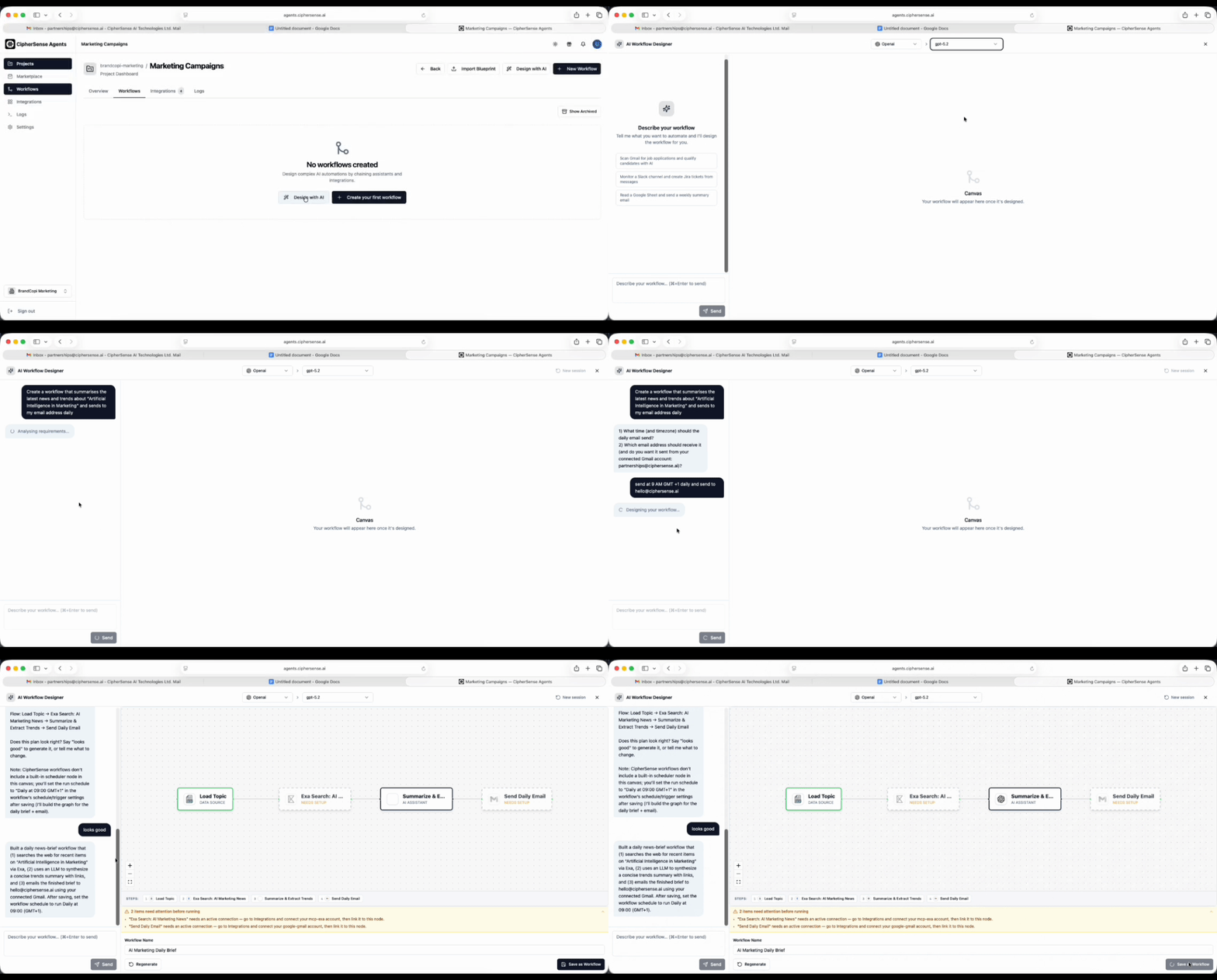
Here's what a session might look like:
You: I want to automatically qualify inbound leads from our website form. If the lead's company has more than 50 employees, assign them to the enterprise sales team in Salesforce and send a Slack notification. Otherwise, add them to a nurture email sequence in HubSpot.
CipherSense AI: Got it. Here's what I'm planning — a lead intake agent that fetches the form submission, a data enrichment step, a conditional branch on company size, and two output paths: one to Salesforce + Slack, one to HubSpot. Does this look right?
You: Looks good, build it.
Within moments, a complete visual workflow graph appears on screen — nodes connected, branches configured, integrations mapped. Name it, save it, and it's ready to run.
How it works
Design with AI is built around a three-phase conversational flow designed to get your workflow right before generating anything.
Clarify — The AI asks targeted questions to fully understand your requirements, data sources, and desired outcomes. Nothing gets built until it's confident it understands the intent.
Present a plan — Before generating a single node, the AI describes the workflow it intends to build in plain language. You can approve it as-is or ask for refinements.
Build — Once you approve, the AI generates the full workflow graph: every agent, every integration, every conditional branch, every data connection — laid out cleanly and ready to review.
The canvas preview updates in real time as the workflow is being generated. If something doesn't look right, keep chatting — the AI retains the full conversation context and iterates on what it already built.
Key features
Works with your connected integrations The AI knows which integrations your team has already set up — Gmail, Slack, Salesforce, Notion, Stripe, HubSpot, and 70+ more. When you describe a workflow, it automatically maps to the right integrations from your existing connections.
Choose your own AI model Design with AI works with whatever LLM your organization has configured — Anthropic Claude, OpenAI GPT-4, DeepSeek, Google Gemini, Grok, Perplexity, and more. Your organization stays in control of which model does the heavy lifting.
Real-time canvas preview A live visual canvas updates alongside the chat as the AI generates your workflow. You get an immediate picture of the structure — how nodes connect, where branches split, where data flows — before saving anything.
Readiness checks built in After generation, a built-in readiness checker flags anything that needs attention before the workflow can run: missing prompts, unconfigured connections, or incomplete conditions. Jump straight into the full workflow editor to make those final tweaks.
Persistent conversations Your design session is saved automatically. Come back later, pick up where you left off, and keep refining. The AI remembers everything.
@ mention support
While typing, use @ to reference specific integrations, available models, or nodes already on the canvas — useful for complex workflows where precision matters.
Who is this for?
Design with AI was built for teams who deeply understand their business processes but have been blocked by the technical complexity of workflow builders.
- Operations teams automating multi-step internal processes without needing an engineer
- Sales and marketing teams building lead qualification, outreach, and follow-up automations
- Customer success teams creating automated escalation, ticketing, and notification flows
- Business analysts prototyping AI-powered workflows before handing them off to a technical team
- Founders and small teams moving fast without specialist resources
If you can describe what you want in a sentence, you can now build it.
A smarter starting point for technical teams, too
Design with AI isn't only for non-technical users. For developers and automation engineers, it's a powerful way to scaffold complex workflows quickly. Generate the core structure in seconds, then open the full visual editor to fine-tune expressions, adjust node parameters, and connect the remaining pieces. What used to take hours of node-by-node configuration can now start with a well-placed prompt.
Getting started
Design with AI is available to all CipherSense Agents users today.
- Navigate to your Workflows dashboard
- Click the Design with AI button (the wand icon) in the top right
- Select your preferred AI model from your organization's configured providers
- Start describing the workflow you want to build
No setup required. Your connected integrations are automatically available to the AI.
What's next
This is the first version of Design with AI, and we're already working on what comes next:
- Natural language editing — modify existing workflows by describing the change you want, not by clicking through node settings
- Workflow templates from intent — AI-suggested starting points based on your industry and use case
- Multi-workflow generation — describe a suite of related automations and have them generated together
- Deeper readiness automation — the AI proactively fills in common parameters and prompts where it can, reducing post-generation setup
We believe workflow automation should be as accessible as writing an email. Design with AI is our biggest step toward that yet.
Have feedback on Design with AI? We'd love to hear from you — reach out to our team or drop a note in your organization's support channel.