

Gemma 4 Is Here — Build Smarter, Safer Workflows for Healthcare & Finance
Google DeepMind's Gemma 4 brings frontier-class reasoning, 256K context, and multimodal support under an Apache 2.0 license. Here's how to use it in CipherSense Agents via HuggingFace and Ollama — and why regulated industries should care.
Google DeepMind just released Gemma 4, and it is a significant step forward for teams that need powerful AI with the transparency, control, and compliance posture that regulated industries demand. With an Apache 2.0 license, multimodal capabilities, native reasoning modes, and models that run comfortably on consumer hardware, Gemma 4 opens the door to deploying sophisticated AI workflows in healthcare, finance, and other sensitive verticals — without sending your data to a third-party cloud endpoint.
CipherSense Agents supports Gemma 4 today via HuggingFace and Ollama. Here's what that means for your team.
What Is Gemma 4?
Gemma 4 is a family of four open-weight models released by Google DeepMind under the Apache 2.0 license:
| Model | Parameters (Active) | Context Window | Modalities |
|---|---|---|---|
| gemma-4-e2b | 2.3B | 128K tokens | Text, Image, Audio |
| gemma-4-e4b | 4.5B | 128K tokens | Text, Image, Audio |
| gemma-4-26b-a4b | 3.8B active / 25.2B total (MoE) | 256K tokens | Text, Image, Video |
| gemma-4-31b | 30.7B | 256K tokens | Text, Image, Video |
The architecture uses a hybrid attention mechanism — interleaving local sliding window attention with full global attention — making long-context reasoning significantly more efficient. The 26B model uses a Mixture-of-Experts (MoE) design, activating only 3.8B parameters per inference pass, giving you near-large-model quality at a fraction of the compute cost.
Benchmarks Worth Noting
- MMLU Pro: 85.2% (31B) — strong general-purpose reasoning
- AIME 2026: 89.2% — competitive mathematical reasoning
- LiveCodeBench: 80% — production-grade code generation
- 140+ languages with native multilingual support
- OCR and document parsing built in
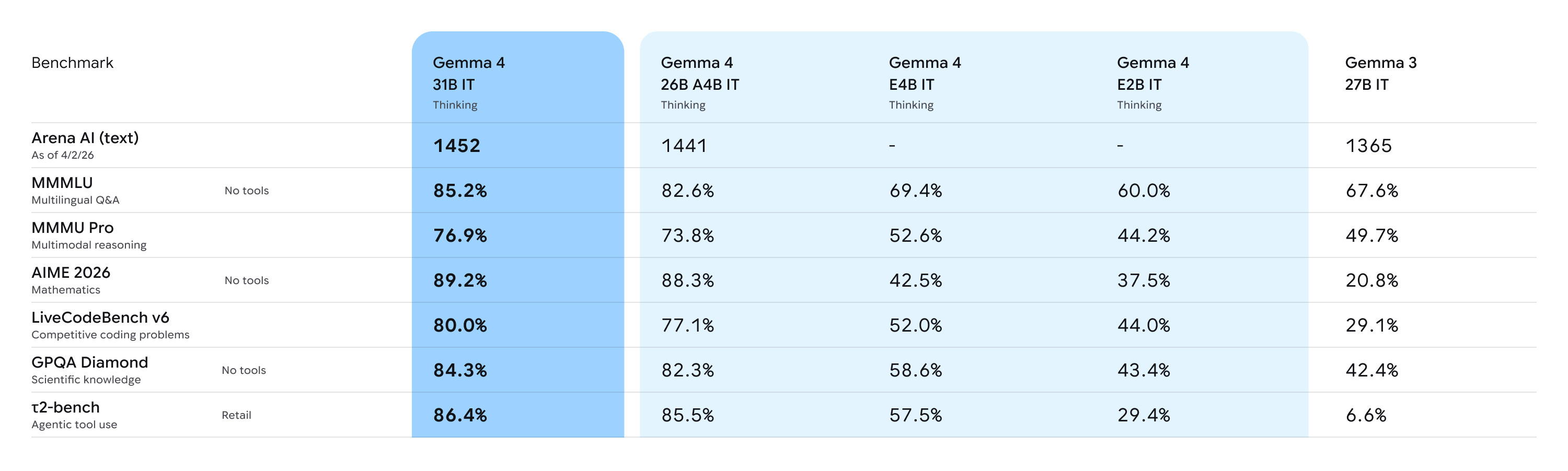
These are not toy numbers. For agentic workflows that need to reason over long documents, extract structured data, or handle multilingual inputs, Gemma 4 is genuinely competitive with much heavier proprietary models.
Why Sensitive Industries Should Pay Attention
Healthcare and finance teams face a common dilemma: the most capable AI models are hosted by third parties, and sending patient records, clinical notes, financial statements, or transaction logs to an external API creates real compliance risk — HIPAA, SOC 2, GDPR, PCI-DSS, and more.
Gemma 4 changes the calculus.
For Healthcare
- Run the model fully on-premise or on a private cloud. Patient data never leaves your network.
- Use the 256K context window to process full clinical records, discharge summaries, or radiology reports in a single pass — no chunking hacks.
- Image and video modality support means you can build workflows around medical imaging documentation pipelines, with the model parsing visual content natively alongside clinical text.
- Native OCR capabilities unlock structured extraction from scanned intake forms, insurance documents, and lab results.
For Finance
- Ingest and reason over long-form financial filings — 10-Ks, 10-Qs, prospectuses — without truncation. The 256K context window handles these comfortably.
- Multilingual support across 140+ languages enables global compliance workflows, cross-border contract review, and international reporting pipelines.
- The MoE 26B variant offers near-frontier reasoning quality while staying runnable on a single A100 or consumer-grade workstation — lowering infrastructure cost without sacrificing capability.
- Function calling and agentic tool-use support lets you wire Gemma 4 into approval workflows, automated reporting pipelines, or risk-scoring agents.
The Apache 2.0 license also matters here: you get full auditability over the model's usage, no vendor lock-in, and the flexibility to fine-tune on proprietary datasets without licensing restrictions.
Running Gemma 4 in CipherSense Agents
CipherSense Agents supports Gemma 4 through two integration paths: HuggingFace Inference API (managed, zero-GPU-setup) and Ollama Cloud (flexible, open-weight catalogue). Both are configured in your Organization Settings under LLM Providers.
Option 1 — HuggingFace Inference API
HuggingFace hosts Gemma 4 via their Inference API, meaning you can use the model without managing GPU infrastructure.
Steps:
- Create a HuggingFace account at huggingface.co. A free account gives access to many public models.
- Generate an access token — go to Settings > Access Tokens and create a token with
readscope. - Find the model ID — navigate to the Gemma 4 model page on HuggingFace and confirm the Inference API badge is active. The model ID follows the format
google/gemma-4-27b-it. - Add the provider in CipherSense — go to Organization Settings > LLM Providers > Add Provider. Select HuggingFace, enter your access token and the model ID in
owner/model-nameformat, and click Save. - Build your workflow — when creating an Agent node in any workflow, select HuggingFace as the provider and choose your Gemma 4 model. Your workflow will now route inference through HuggingFace.
This path is ideal for teams that want to get started quickly without standing up any infrastructure — and because HuggingFace supports gated model agreements, you can ensure only authorized personnel in your organization have access.
Option 2 — Ollama Cloud
Ollama Cloud is a hosted inference service that carries a wide catalogue of open-weight models including Gemma 4. It is a good fit when you want a managed endpoint with simple API-key auth without managing HuggingFace model IDs directly.
Steps:
- Create an Ollama account at ollama.com and navigate to the Cloud section.
- Generate an API token — in your Ollama Cloud account settings, generate a token. Copy it immediately — it is shown only once.
- Add the provider in CipherSense — go to Organization Settings > LLM Providers > Add Provider. Select Ollama (Cloud), paste your API token, choose your Gemma 4 model variant from the dropdown, and click Save.
- Assign it to an agent — in your workflow editor, select any Agent node and set the provider to Ollama and the model to your chosen Gemma 4 variant.
Ollama carries Gemma 4 variants from the compact e2b (4.2 GB) up to the 31b dense model (19 GB), in GGUF quantization so they load fast and run efficiently.
A Practical Workflow Example: Clinical Document Summarization
Here's what a healthcare workflow might look like in CipherSense Agents with Gemma 4:
- Trigger — a new patient discharge document is uploaded to your secure storage bucket.
- Parser Agent (Gemma 4 via Ollama,
26b-a4b) — receives the raw document (PDF or scanned image), uses Gemma 4's native OCR to extract text, and identifies key clinical entities: diagnoses, medications, follow-up instructions. - Reviewer Agent (Gemma 4 via HuggingFace,
31b) — takes the extracted data and produces a structured clinical summary in a predefined JSON schema, flagging any high-risk medication interactions or missing required fields. - Notification Node — routes the summary to the relevant care team channel.
The entire pipeline runs on models you control, under a license you can audit, with no PHI leaving your environment.
Getting Started
If you are already on CipherSense Agents, adding Gemma 4 takes less than five minutes:
- Navigate to Organization Settings > LLM Providers
- Click Add Provider and select HuggingFace or Ollama
- Enter your credentials and select a Gemma 4 model variant
- Drop an Agent node into any workflow and assign the new provider
Gemma 4 represents a meaningful shift: frontier-class reasoning, long context, multimodal support, and full ownership of the model — all under an open license. For healthcare and finance teams that have been waiting for an open-weight model they can trust in production, this is the one to watch.